
 English
 Español
 Français
 Português
How to Stack switches by using Skylane Optics DAC cables?

Switches “stacking” is an easy way to increase capacity and flexibility by operating all the stacked switches as a single unit. In many cases, switches able to be stacked have dedicated ports to be plugged with “Vendor stacking cables”. In some cases, DAC cables can be used.
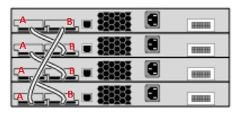
What is a stacking cable?
Stacking cables are only used with stackable switches to be physically connected to create a single unit. The stacking cables come in different variants according to the vendor, the type, and the capacity of the switch as well as other elements.
The dedicated Stacking cable will have a proprietary design and form factor and will then be purchasable only from the vendor. It makes the dedicated stacking cable irreplaceable and more expensive than standard DAC cables.
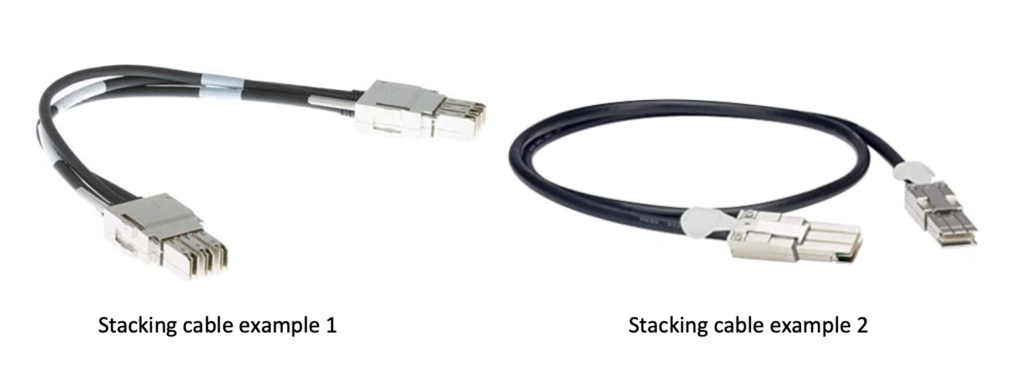
Can I use DAC Cable for stacking?
Direct Attached Cables (DACs) are mainly used to transmit data over 10G, 40G, 100G ports and over by connecting network switches to switches, routers or servers. For some of this equipment, DACs can also be used as stacking cables, offering a simple and very cost-effective stacking solution.
How and when to use DACs for stacking?
When the stackable switch or router allows front-panel stacking, meaning stacking using an Ethernet port of the front-panel of the equipment. One port of each switch or router being stacked is then used for stacking instead of data transmission, but the same DAC can be used for both Stacking and data transmission.
How can we summarize this?
Dedicated stacking cables are used:
- when the stackable switches support backplane stacking (BPS)
- when a dedicated stacking cable is needed
- It is not possible to use standard DACs to stack your switches and routers
DAC cables are used:
- For data transmission
- when the stackable switches support front panel stacking (FPS)
- When stacking can be performed using Ethernet ports
While not able to provide proprietary stacking cables, Skylane Optics offers a wide range of DAC cables coming in different lengths and compatible with all the major brands of equipment.
 Data Sovereignty Begins at the Hardware
 High-Performance Optics for the Memory Crunch
 Celebrating 4 Years as Part of the Amphenol Family
 A New Era: 1.6T OSFP224 2xDR4 Transceivers
 Expand Your Optical Network with EDFAMUX